Showing posts with label iphone. Show all posts

Wednesday, May 6, 2009

The Top 10 iPhone Application From April 2009

Hello, and welcome to the fourth installment of iWant, iNeed, iRecommend. This is a monthly series that will, simply put, talk briefly and present the top ten iPhone and iPod Touch applications from that month. At the end of the year, the 120 mentioned applications will then go head to head to see which apps become the top ten for the year. If you would like to read my previous top ten lists, as well as all my other iPhone and iPod Touch application reviews, you can see them here. While this list is subjective (as are all top ten lists), I did my best to base this on actual use, not my own opinion. Enjoy.


10: Mathhammer 40K
There is a certain tabletop war game. One that millions of people around the world play, and one that I play almost every weekend. This game is called Warhammer 40K, and it is a game of odds, dice, and strategy. There is a style of the game where you calculate odds before you attack, to make sure that you have a good chance of winning. To do this, people created Mathhammer, a system where you enter all variables and the odds are calculated for you. While you can look at this on a computer, or do it by hand, most players were never able to do it at tournaments or on the road. Enter Mathhammer 40K, an application that will do it all for you. As I have been able to use it in many games, I know for a fact that my $4.99 investment has been well spent.

9: iRentMovie

Ahh Netflix, the comapny that changed how video renting would be done. Furthermore, this company even caused me to break up with my longtime renter, Blockbuster. Until April, however, the service had never fully embraced the changing way people access their information and movies – their phones. You had to log onto a computer, log into the site, and then access all of your movies, add to queues, and even alter the ques themselves. No longer do you have to do that, as iRentMovie allows you to access, alter, and add to any of your Netflix choices with your iPhone or iPod Touch. The application even will show you the top ten lists and many of the best-classics lists. IRentMovie is a $2.99 app that goes perfect with your Xbox360, TiVo, or anything else you use to watch movies.

8: Carminder
Do you have multiple cars, each with a different oil change and tire rotation mileage? Or, are you just sick of remembering all of the maintenance that you need to do? Well, Carminder is the perfect application for you. Carminder remembers everything, from every car that you own. Tire rotations, radiator flushing, brake pads, and even windshield wipers – all of these, and even more, are kept on your iPhone or iPod Touch to help you remember. This is the perfect application for anybody who has too many cars to keep track of, or simply too much information to remember. And, at only $1.99, Carminder will not break your bank.

7: Rest Area
There is something about road trips that just makes you have to go to the bathroom way too often. This, of course, is most noticeable when you have children in the car with you. This is where Rest Area comes in, an application that uses the iPhone's GPS chip and will tell you where, and more importantly, how to get to, the closest rest area. Even further, Rest Area will provide you with all the information that you want, from what food they have to the picnic area size. At just $.99, Rest Area is a perfect add on for your road trip.

6: Congress, Congress Pro, and various State Pro
The applications from the Cohen Research Group are interesting and very informative. Congress and Congress Pro will give you all sort of information about various congressional leaders, members, and the laws they pass. Georgia Pro, California Pro, Name-Your-State Pro will give you information about the members of the state government and their laws. All of these applications are informational, useful, and great for, well, anybody. Though they are intended originally for Blackberry devices, the port to the iPhone and iPod Touch is flawless and well done. The price, however, might hold you back, as the applications range from $.99 to $19.99, depending on which you want.


5: Tap Tap Coldplay
Continuing their placement on my top 10 lists, Tap Tap came out with yet another iteration: Tap Tap Coldplay. Just like with all of their previous games, Tapulous has created an amazing rythmic music game where all you do is tap your iPhone screen in time with the music. While this might sound stupid and boring, it actually is quite entertaining and enjoyable. This time, however, instead of featuring various bands, Tap Tap Coldplay only plays Coldplay music, which is something I love. Take it from me, a Coldplay fan, all other fans of the band will love this application. At $4.99, Tap Tap Coldplay will give you plenty of playtime and amusement.

4:CIA World Factbook
Do you want to know what the flag of Scotland really looks like? What about the size of the military of Israel (remember, they 'don't have nukes')? No matter what you want to find out, if it is public record, then the CIA World Factbook will have it. The Factbook has been published since 1962, but it didn't go online until th early 2000s. Now, finally, the Factbook has made yet another leap, it has made it to the portable phone market. Using your iPhone or iPod Touch, you can explore the entire world, learn thousands of new things, and answer all of your quiz questions. At only $.99, there is no reason not to grab a copy of CIA World Factbook today.

3: Doc Scanner
For most months, Doc Scanner would probably be the best application of that month; for April, however, it was beaten by two better applications. Don't get me wrong, this application is still amazing and highly usable. Grab your iPhone, take a picture, and you can scan it into a PDF document. It is really that simple, and really that useful. You can use Doc Scanner to scan anything, send it into work, or use it to 'fax' a contract to your partner. Even more, the application will crop and isolate the image for you, so you have no work to do. At $9.99, Doc Scanner might be a bit expensive, but it is worth it.

2: Camera Zoom
The biggest thing missing on the iPhone is the ability to zoom in with your camera. Even the cheapest camera phones on the market can zoom, yet the iPhone can not. Finally, there is an application that fixes this issue. Camera Zoom will apply standard antilogarithms to digitally zoom up to 4 times. The application will adjust automatically, display the zoom in real time, and lets you tap anywhere on the screen to get a picture off. In all, this is the most complete and, probably the best camera application currently out there. And, for only $.99, there is absolutely no reason not to get Camera Zoom.

And the #1 iPhone applicationS from April 2009 is…

1: The Travelto and Travel Guide Applications
For the first time ever, I have picked two apps to share the first place prize. Both of these apps do similar things, and both are extremely well made. Travelto focuses more on countries, and gives you details on where you want to go, what you want to do, and what to say. The Travel Guides are more along the lines of a city guide book, and they inform you on all of the small-time, but locally loved, scenic spots in each city. Both applications are well designed, impliment the iPhone controls well, and look perfect. You can get a Travelto guide for $.99 per country and a Travel Guide for $.99 per city.


Well folks, there you have it, the top 10 iPhone and iPod Touch applications from April 2009. If you have any suggestions for next month's list, or want to tell me what I missed, please let me know in the comment field.
Read more ...

Monday, April 20, 2009

iPhone Game Review: Smack Me

Think of Bop It, but on your iphone

What is the 17th best selling iPhone paid application? What was the best application of February 2009 on Blogcritics? What gives you a retro feel, yet also gives you hours of great and addictive game play? If you cheated and looked, then you already know that the answer is Smack Me, a sweet iPhone and iPod Touch game from FunMobility.


Smack Me is a modernistic version of the classic Bop It game. The iPhone shows you an image and an accompanying command – lift me, freeze me, smack me, pinch me, etc.. Your job simply is to do exactly what it is asking of you, within a time frame, while listening to absurd retro music that keeps speeding up. Though it is easy at first, it keeps getting harder and harder as you unlock more difficult levels.

Smack Me has a very basic premise and concept behind it, but that is what makes it so much fun. You can sit there for hours simply following very basic commands, but never see repeats or patterns. This seems easy, but it is really not. The fact that you need to get it right every time, that the sequences get faster, and that the music has alternating beats really throws you off, which in turn really makes it a difficult game. I love how hard it is to play this game, as it gives it not only the retro feel, but also the ability to play over and over.

With these ever changing patterns, Smack Me is also an extremely addictive game to play. Nothing is ever the same from one minute to the next, and there are never any repetitive patterns. Additionally, with the difficulty of the actual game, it was very hard to finish games 100% on the hardest difficulty. Due to this, I kept replaying Smack Me because I wanted to complete the game 100%, do it better, and do it faster. Addictability is essential in any simple game, as it is the only way to keep you playing the game for hours.

I am a retro guy front to back; I like Jumpman, Pac Man, and techno. If something is playing music at me in an 8-bit format, I will instantly fall in love with it. One of the things that I really like about Smack Me is the fact that it has an amazing retro feel. The game is simple and easy, with commands that remind me of things I would find on my old Sega Genesis. The music is technoy, which not only amuses me, but reminds me of my Daft Punk era. Lastly, the voice that commands you in Smack Me is projected in 8-bit format, which means that I love the game. Toss in the fact that the high-score table looks like the ones that you would find on old arcade games and you have a great mix.

The only thing that I find concerning about this game is the fact that the price is too high for most people in the app store. People seem to either want free games or things that cost $.99. Very few games or applications are successful over that price point, and, at $1.99, Smack Me puts itself above the upper limits. Due to this, I do not believe that Smack Me will be able to reach the entire target audience, as most of them will not pay that much. That said, however, I believe that Smack Me is worth the cost, and that it will give you hours of enjoyment.

In the end, I really can not praise Smack Me too much. This is one of the best games available on the iPhone and it is probably going to be a strong candidate for best iPhone application/game of 2009. By utilizing all of the fun principles of the iPhone, from muti-touch to the accelerator, the game really gets you into it. This game is easily one of the most addictive out there, on any platform, and it is a game that you will fall in love with immediately. When I first downloaded Smack Me, I played it for several hours on end. Due to the amazing game play and addictive qualities, Smack Me receives 5-out-of-5 stars.


Smack Me has not been rated by the ESRB. The game is currently only available for the iPhone and the iPod Touch
Read more ...

Friday, April 10, 2009

The Top 10 iPhone Applications from March 2009

Yes kids, it’s time for another adventure in Appleland

Hello, and welcome to the third installment of iWant, iNeed, iRecommend. This is a monthly series that will, simply put, talk briefly and present the top ten iPhone and iPod Touch applications from that month. At the end of the year, the 120 mentioned applications will then go head to head to see which apps become the top ten for the year. If you would like to read my previous top ten lists, as well as all my other iPhone and iPod Touch application reviews, you can see them here. While this list is subjective (as are all top ten lists), I did my best to base this on actual use, not my own opinion. Enjoy.


10. Duck and Cover
What application gives you no help in an emergency? What can’t float in the event of a tidal wave? What is guaranteed (or your $.99 back) to not repel Godzilla? If you said your iPhone, then you are wrong; however, if you said the Duck and Cover application for your iPhone, then you are 100% correct. Really, this application does absolutely nothing, but that is what is so sweet about it. Personally, I have a bit of a soft spot for satirical things, and Duck and Cover is most certainly one of those. You can get Duck and Cover for $.99.

9. Historic Sites
Historic Sites is an nice little application for your iPhone that will help you find interesting and unique historical places. Using your phones geopositioning system, this application will search the National Registry of Historic places and pull up information for you. You can find information, both from the Registry and from the internet, while still remaining in the app. Should you decide that you want to go there, Historic Sites will give you directions and/or a map. I believe that Historic Sites is great for any family road trip, and at $.99 it is a steal.

8. Darwin Collection
Even before the Kindle application for the iPhone came out, many companies were making their own Ebooks for the iPhone. IndiaNIC was one of these companies, and they made ton of Ebooks that looked unique. All of their applications have adjustable font settings, day and night modes, white noise generators, and bookmarks. With their Darwin Collection, IndiaINC combined all of the books that were published by the famed English Naturalist. I strongly recommend this application for any botanist, naturalist, scientist, or biologist out there. You can get Darwin Collection for $1.99.

7. Don’t Panic
I know what you are thinking, no, Don’t Panic has nothing to do with The Hitchhikers Guide to the Galaxy. I was disappointed when I found that out too. However, it is a pretty cool little app. Basically, Don’t Panic is a collection of quotes, sayings, and other random things that are supposed to calm you down and reign you in from your hectic lifestyle. It also can play some soothing music, which should help take you out of the hustle and bustle that surrounds you. At $1.99, Don’t Panic is a good way to relax whenever you have a second at your disposal.

6. 1st in History
By now, most of you know that I love trivia and random facts. In fact, I usually have a trivia application in each of my top 10 lists. 1st in History is that trivia application from Match. 1st in History is a pretty basic application, but it does what it says. It asks you a question, then you need to guess the person or thing that did it first. You touch the screen and it gives you the answer. Though this sounds basic, this is good training for you local bar’s version of trivia, and it might help you win some bets. Plus, at a price of NOTHING, 1st in History can’t really go wrong.

5. Kindle for the iPhone
Kindle for the iPhone was launched at the beginning of March with much fanfare. Finally, people could read the Ebooks that they bought from Amazon on the iPhone. While most public domain books were already covered (see my 2nd place and my 8th place for examples), now they could read new novels. You can adjust text size, sync with your actual Kindle, and also leave bookmarks. Simply put, this application is everything you would expect from the real deal except with a smaller screen. Though you can get Kindle for the iPhone for free, most books will cost you $9.99.

4. Air Browser
Also widely discussed in early March was a change by Apple to allow other browsers in the app store. The best of these new browsers, many of which showed up on the same day, was Air Browser. Built from Safari, Air Browser allows you to do everything that you expect from a normal desktop browser. There is tabbed browsing, bookmarking, Google suggestions, and history. Plus, it tosses in things like private browsing, shake navigation, and favicons (favorite icons), which you can only find on the iPhone. If you want a better and fuller browsing experience, then drop $1.99 for Air Browser.

3. Tap Tap Revenge 2
Back on my top 10 of 2008 list, Tap Tap Revenge made it in as number 9. In March, the second take of this game has made it all the way up into spot number 3. Though it is still not my cup of tea, over 19,000 reviews on iTunes means that the iPhone owning public loves Tap Tap Revenge 2. The game is extremely simple; you tap a glowing orb when it passes through a circle at the bottom of your screen. And, just like in Guitar Hero, the taps coincide with the music that is playing. Containing over 150 songs from various artists, Tap Tap Revenge 2 is a great free application.

2. Books by Ubiklabs
Keeping with the theme of Ebooks, which does seem to be the main focus this month, the number 2 spot goes to a collection of them from Ubiklabs. The company has put out over 30 Ebooks, all of which are in the public domain, including Don Quixote, Tom Sawyer, and, you guessed it, Origin of Species. The books, which are available in English, French, German, Italian, and Spanish all come with bookmarks, page turning animations, and a gentle font that is easy on the eyes. You can grab individual books from Ubiklabs for $1.99 or $2.99, depending on the title.


And the #1 iPhone application from March 2009 is…

1. Steve Parker’s EZ and Easy apps
The number 1 spot, just like the number 2 spot, is a collection of applications. Ranging from a search function, to news, to weather, these applications from Steve Parker are extremely localized and extremely easy to use. EZ News is an application that links to the 6 most popular news agencies (CBS, CNN, Fox, MSNBC, Yahoo, USA Today) and shows them in a format that works perfectly for the iPhone. Though this wasn't his first application, Steve has released several iterations of EZ Radar, which is a localized radar for various regions of the country. These are easier to use then the built in weather application, and they show animated radar. You can get the EZ applications for either $.99 or $1.99, depending on the app.


Well folks, there you have it, the top 10 iPhone and iPod Touch applications from March 2009. If you have any suggestions for next months list, or want to tell me what I missed, please let me know in the comment field.
Read more ...

Wednesday, April 8, 2009

iPhone Application Review: Dub – No More Business Cards

Sick and tired of a fat wallet due to all the business cards that you need to carry? Want to stop wasting trees and harming the environment? Just want to make yourself look cool and use sweet new technology? If you answered yes to any of the above questions, or simply want a much easier way to exchange business information, then I have the perfect iPhone application for you.


Dub is a new application that is, essentially, a business card on your phone. You can swap phone numbers with clients, give your email address to new buyers, and even update your information on the fly, with the new changes automatically being sent to your contacts. Dub is available on most smart phones (Blackberry, iPhone, Android, etc.) and can also be used by most texting phones. You can use it to sync data to your contact list, send group invites, and it is even integrated with Facebook and Linkedin. Dub updates the business cards to the new millennia.

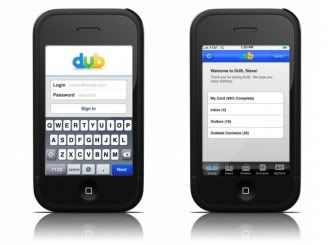
Dub is actually quite simple to learn and use. When you download the application, you are able to immediately start to edit your contact information. Enter you name, phone number, email, addresse, IM program name, etc. and you are done. Everything has an easy box to fill in and is extremely easy to do. You don’t even need to fill everything in; just enter the information that you want others to see. Once you get all of this done, you can send invites (give your card to somebody) by entering an email address. Others can do the same (giving you their card) by entering yours. Everything is quite easy to use.
I really like how easy the application is to use. With everything in nice, neat boxes, I quickly was able to enter my information and jump to the next spot. This is essential in any application that needs this much data, as otherwise it would be tedious and pointless. Along with this, the overall layout and feel of the application helped me use it. By being formatted for the iPhone, Dub felt smooth and well polished. I was able to use the easy navigation buttons, and the scroll lists were a huge plus. By making it feel natural, it only makes it easier to use; this, in turn, then leads to more people using it.

Another thing that I like about Dub is the fact that it is integrated with almost everything. I can have things automatically update to my twitter, sync with my Outlook, and work within Linkedin. Heck, it even is integrated with Facebook. Even nicer, Dub allows me to automatically update all of my contact information from Gmail, Outlook, iMail, etc. Features like this help the transition users to the new technology, as Dub does everything automatic and quickly. Hopefully this will help to expand the use of Dub, as that will help it even more.

On the other hand, there are a few problems with Dub. For starters, there are not many people using the software. While I believe that it will grow in the future, any and all startups start quite slowly, and gradually build their base. Dub is no different, but that actually harms the application. While I can get and send contact info, which is changeable, to fellow Dub users, most people I get in contact with will not have the application. How am I supposed to get rid of business cards if most of my clients still use them, and have yet to update. While this is not their fault, until more people jump on the Dub bandwagon, it will be hard to replace business cards with new technology.

Another thing that I am concerned about is the fact that I can only have one profile. I am a writer for Blogcritics, a blogger, a sportwriter, an intern, a student, and a campaign worker. With 5 jobs, each with corresponding contact information, how am I supposed to fit them all on this application? Dub only has spot for one URL, one e-mail, etc. and so it is not that conducive for people with multiple contact needs, and anything like that. I hope that DubMeNow is able to come up with mulitprofile method that allows you to have information for all of your different needs. This would further the application, and make it much more useful.

Overall, I believe that Dub is a nice step towards modernizing our business communications. By linking with everything that we use, making it easy, and ensuring that updates are quick and automatic, Dub is striving to create a brand new niche for itself. I really like the application, and only have a few concerns about it; hopefully DubMeNow will be able to fix my concerns shortly. I believe that any and all business people should get Dub on their smart phones and use it instead of business cards. This saves the environment and makes life so much easier. Due to the ease of use, the automatic updates, and the immigration into everyday life, I believe that Dub is a highly important application that you should grab today.

Dub is available for free from the iPhone app store and is also available on most smart phones in America
Read more ...

Monday, March 30, 2009

An Intro From Barga (and rmb.reviews)

Many of you already know who I am, but it was decided (by myself) that all of us should have intro posts. See, Lisa from Glass City Jungle got confused on one post that was done by Whalertly which she thought was done by me. Due to that, I decided that we should all introduce ourselves. Peter already has given you all an intro, as has Ander. There are four people that have yet to be introduced (RMB.reviews, Myself, Whalertly, Kadim) and two of them will be introduced here.


As many of you know, I am both Barga and RMB.reviews.

Barga is my more used name, and the one that I have been using for a long time. The name 'Barga' is my last name, and something that I have been called for years. I am the founder of this site, and still the primary poster (though Whalertly has been catching up). My major is political science (American focus) and I am minoring in english. I like long walks on the beach, eating chocolate, and rooting for the Blue Jackets. I am 21...

On the more political note, I am almost dead center of the 'hot topic' issues. On other issues, where the leaders can actually touch them, I am slightly to the left. That said, I will never vote on a party line, but instead will vote based on the actual person. While I used to write about politics far more, I am slowly phasing out of that for reasons that some of you already know (no, the rest of you don't get to know).

That is really all there is to know about me


RMB.reviews is my name for product reviews and the like. Though most of these are published first on blogcritics, a few are published just on this site. I specialize in iPhone and iPod Touch games, but am willing to review pretty much anything. Additionally, I am now credentialed as a sports writer for the Clippers, and am working on full credentials for the Crew and the Blue Jackets. That is pretty much it here as well

See, I am just a boring person. Feel free to leave comments or ask anything you want
Read more ...

Thursday, March 26, 2009

iPhone ‘Game’ Review: Nano

For the record, Nano placed 5th in my top-10 iPhone Apps of February 2009 article.

Imagine sitting on the bus, your eyes focused on a small device in front of you, soothing music is playing out of your headphones, and your hand casually is moving around the screen of the device. Now, keep that image in your head, but alter it a little; now you are playing a game, the music, though still soothing, changes based on how you play, and all you are trying to do is get some small bits of light into circles. Interesting image, isn’t it? Well, that is exactly what you get when you play Nano, a game that is currently available in the app store for only $.99.


Nano is a piece of software that is perfect for meditation, calming kids down, or just getting some personal time on the bus. The game is slow paced, enjoyable, and, quite frankly, easy to learn and use. In its entirety, Nano is one of the simplest things you will ever use. Use your touch to manipulate ‘magnetic’ arrows, which direct balls of light around the screen. Aim the cool colored balls (blues, greens, whites) into floating circles. Warm colored balls (reds, oranges, yellows) you want to direct away. That is all that Nano is, and that is why it is so peaceful.

Take a look at the this video and think about what you just saw. This, quite literally, is all that Nano is. Notice how simple it is, how soothing it is, and how unique it is. Now, if the game looked at all interesting to you (even if it just barely peeked your interest), then odds are that you will enjoy it. However, if the video of Nano looked boring or dull, then don’t bother downloading it at all.

Nano is a polarizing game, with people loving it and people hating it, very few are neutral on the game (at least, that is what the reviews and ratings in the app store seem to say). Though I believe that the video test (as indicated above) is a good way of telling how you would perceive the game, I still see some problems with it. This probably stems from the fact that Nano is labeled and categorized as a game, though most people wouldn’t consider it one. To be a game, or to not be a game, that is the question.

For most, a game is something where there is an end objective, fast paced gameplay, and actual challenges you must face. None of these are present in Nano, so it must not be a game. I actually agree with this argument, I feel that Nano is more of a meditation device, and a cool music-based piece of software, than a game. I believe that people looking for a game are going to be disappointed, and that might be why there is such a wide gap in the perceptions of the application. However, this is probably up to each person, so take a look at the video, and decide for yourself.

My favorite feature in Nano would, quite frankly, be the fact that it allows me to meditate. I love the simplicity of the game, and how all I have to do is slowly change the various magnetic currents to either target or avoid certain colors. To me, this is so unique in the app store, and as unique in the software world as a whole, that it is a fun and interesting concepts. I really like the fact that I can just sit there and watch the balls move around, alter their course as I please, and just let the music take me in. Heck, I don’t even need to try to stop the hot balls from entering (it does cause a ‘bad’ musical change, however), as I can just sit there and let a steady stream enter the floating circle. To me, the ability to meditate in Nano is essential, and really nice.

Another nice feature about Nano is how the music changes based on what you do. When using the application at first, I thought that the music was just naturally changing as part of the game, not as part of my actions. However, after playing for an extended period of time, I started to notice that the pitches and tones changed based on what I did. To me, this drew me further into my meditative state, and it made me enjoy Nano even more.

Though these do not detract from the overall experience of using Nano, I would like to point out two problems with this application. For starters, the load time of Nano is exceptionally long, and it will sometimes freeze. This is probably due to the fact that the iPhone keeps many things running even though they are 'closed', thus Nano has to clear memory for itself. Depending on how bad it is, you might freeze the phone by hitting either two physical buttons on your phone. I suggest that you hard reset your phone if this happens. The other issue is that I would like to see the magnetic currents of Nano reset themselves each level. Currently, they stay facing the same way that they did when the last level finished, and that annoys me. As I said before, both of these do not detract from the overall Nano experience.

Overall, I feel that Nano is an application that is easily worth the $.99 investment to buy. I really liked the application, enjoyed the music, and loved to be lost in it. However, I know that not everybody will like, get, or enjoy the game. With this in mind, I urge you to view the video, and then decide from that. The simple ability to meditate, while on a crowded city bus, showed me how much Nano was truly worth. Due to that, as well as how much I actually liked the game, I am giving Nano five-out-of-five stars. Congrats.

Nano has not been rated by the ESRB. The game is currently available on the iPhone and iPod Touch


Read more ...

Friday, March 13, 2009

Update time, enjoy

So, I figured that it was time to update you guys on some posts I did in the past, and see how they have changed or altered our course. Some of these are just updates, others discuss how our posts were used, and some are just fun factoids.
Enjoy...


USG and their job: USG voted today to accept the semester switch. I am hoping that there is a legal way to stop it which will pop up soon (KADIM, where are you??). That said, my facebook group against it has grown by over 500 members since this morning. Keep in mind that it was at 10 for about 7 months and now is at 518 and growing. Join it

Change is Coming: As most of you have noticed, we now have 5 active posters, and one sitting there doing nothing. Additionally, I am working on migrating us to our own website, as I see more traffic and potentiality with that site.

Adsense: I have not updated the authors, too bad. Adsense has been doing well in this time, and made over $121 since the post. Thanks all.

Senators to Watch For: Currently, both Fisher and Bruner have declared a campaign. As has Mr. Portman. I know that 3/8 is not good, but there still are two years left

Ten Tech. Predictions: I made ten predictions that I believed would happen in 09. So far, I have been right on several:
Apple is loosing market share
Netbooks are taking off
Rockband/Guitar Hero released a join controller
More will come as the year goes on

My Tat: My tattoo has almost fully healed, and it is doing well. Pictures next time I find my camera

Whalertly sponsoring Weight Loss: Though Gwenn is at a plateau right now, she has been losing weight. I wish her the best of luck

A name for a sports post and Blue Jackets first post: Both of these got various attention and emails, which is good. I chose ABCs of Columbus Sports as the name, and had my first blue jackets post go live. Please check out the actual posts.


Read more ...

Thursday, March 12, 2009

iPhone Application Review: Thirsty Pocket

Are you tired of the dogma that craigslist has on online classifieds? Sick of the ever increasing fees charges by ebay, or their ever changing rules? Just want an online classified that you can easily use from your iPhone or iPod Touch? If you answered ‘yes’ to any of the above questions, or you just want to try a new online marketplace, then Thirsty Pocket is the application you need.


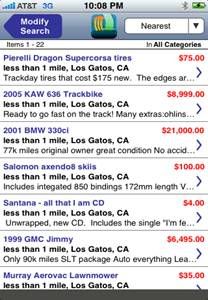
Thirsty Pocket is just like ebay, amazon, and craigslist, but much easier and much better to use. The application connects you to a simple online marketplace, where you can sell, browse, and/or buy many different items. A simple quick search gathered over 1,000 items near me ranging from a 69 Austin Martin (I wish I had that sort of money) to a scientific calculator. The market is open, more user friendly, and a lot less draconian then most online markets. This is a huge plus.

The way that Thirsty Pocket works is quite simple. Take a picture with your iPhone camera, upload it to the server, enter some information (price, e-mail for contact, small description), and then sell it. BOOM, done. Some buyer will come strolling past (in an online fashion, of course) and look at your item. Heck, he might even buy it. When that happens, the money moves hands, and everything is done. Both you and the buyer leave as happy people.

One of the nice feature in Thirsty Pocket is the simplicity and ease of use. Literally, I can get a posting up, and start selling, in about two minutes (they advertise one minute, but I have yet to be able to do that). Furthermore, I never need to hook up to a computer or use my digital camera. This simplicity is a huge jump from other online sites, where you need a computer and it takes much longer to get everything set up. Not only does this serve to help distance Thirsty Pocket from the crowd, but it also makes sure that we can all use it on the run, which is what most sellers on iPhones want to do.

Another nice feature is the actual layout of the application. Looking at Thirsty Pocket, you can tell that it was designed with the iPhone in mind. From the ease of the submission, to the overall layout, the online marketplace is perfect for you iPhone. Additionally, it utilizes the flick gesture perfectly, and this is pretty sweet. I think that proper integration is essential for every and any application or game on the iPhone. It makes sure that it fits into the theme and ensures that every user known what to do and how to do it. I am really glad that the makers of Thirsty Pocket took so much time to make sure that the layout and integration was so well done.

Yet another nice feature (I know, they seem to be piling on) is the fact that there is no middle man in Thirsty Pocket, but there is no long-term account and/or fees. This is similar to Craig’s List, and vastly different then all other (save for the aforementioned website) auction and selling websites. Anybody can use it, provided they have the e-mail address and access to the system. There are no fees and long-term agreements that you need to make with the makers of the application, so you can feel comfortable in getting the most bang for your buck. You also will not need to worry about absurd rules being changed, added, and the other stuff that Ebay likes to do to the loyal users. No, with Thirsty Pocket, it is just you and the buyer; they just serve as the host.

This is not always a good thing, however. There can be scams, bad listings, and just bad people; this could turn into the iPhone’s version of classified ads. I am a little worried about a system with no internal policing of people, and no overall insurance over my item. I hate the draconian rules and fees of Ebay, but I do like the protection that it offers. I am not really sure how to fix this concern, save to make people get accounts. The accounts, however, will ruin some of what I really like about Thirsty Pocket. If only we could trust each other.

My only other issue with Thirsty Pocket is the fact that there are not many users. As the application gains ground, it should become better, but right now there is really not that many. To me, I want to be able to find a fair share of what I am looking for for sale, thus allowing me to get the best deal possible. Currently, I am stuck shopping at an oligarchy of online sellers. On the other hand, if I am selling, I want many buyers, so that I can up the price. Thirsty Pocket does not yet have the traffic I would want. When they launch the website (coming soon), I am hoping that this changes.

Overall, I think that Thirsty Pocket has a lot of potential. I love the fact that I no longer need to deal with the draconian rules of Ebay, and that all of the money goes into my pocket. I love the ease of use and the overall feel of the application. I really, really like the fact that there is no long term deal for me to sign. However, the security of my trade does worry me a little bit. I am hoping that an increase in traffic will make Thirsty Pocket a much more used and better application. Currently, due to the slower than desired traffic, I give Thirsty Pocket four out of five stars.


Thirsty Pocket is available on the iPhone and iPod Touch, it will soon be coming to the World Wide Web

Read more ...

Wednesday, March 11, 2009

The Top 10 iPhone Applications from February 2009

Hello, and welcome to the second installment of iWant, iNeed, iRecommend. This is a monthly series that will, simply put, talk briefly and present the top ten iPhone and iPod Touch applications from that month. At the end of the year, the 120 mentioned applications will then go head to head to see which apps become the top ten for the year. If you want to read my post about the top ten iPhone apps from 2008, please visit it here. Or, if you would like to read my previous top-10 lists, please visit them here. While this list is subjective (as are all top ten lists), I did my best to base this on actual use, not my own opinion.
Enjoy.


10: Most Wanted
Most Wanted is an interesting application. Unlike most applications, which require user input, this one is simply a database of information for you. As its name implies, it is a list of the FBI’s most wanted criminals and the most wanted terrorists. It also has a list of missing children, along with their respective photographs. You can submit a tip or just browse the lists. This is an important application for the iPhone, as it could help to solve cases that might otherwise be left cold. You can get Most Wanted for free.


9: iHistory
Imagine having history in the palm of your hand! Well, more specifically, on the screen of your iPhone. That is what iHistory is trying to do, and they are currently doing a good job of it. Though there is not nearly as much information as I would like to see, they have plans to add much, much more history to this application. Imagine being able to see the history of your city, while you were walking around it. iHistory can be yours for $1.99.

8: Jules Verne Masterpieces Collection
When I was much younger, I loved to travel the world, and the solar system, through the pages of Jules Verne. He would take me under the ocean, to the moon, and even to the center of the Earth itself. His novels moved me and inspired me greatly. The Masterpieces Collection is a grouping of his greatest novels, in e-book format, and is readable on your iPhone and iPod Touch. These are all great reads, and classic texts. You can get Jules Verne Masterpieces Collection for $1.99 from the apple store.


7: March Madness
It is time for the big dance, so let’s start the gambling. Actually, don’t start betting, as it is illegal to bet on college sports. Let’s just do the brackets for the bragging rights. March Madness is a piece of software for you iPhone or iPod Touch that allows you to access and create a bracket for the upcoming tournament. Featuring auto complete, enhanced zooming, and automatic score keeping, this application is perfect for your office poll. You can get March Madness for free.


6: Pocket Bracket
March Madness is almost here, and it is time to start making your brackets. I found that there were two great applications for the dance in the APP store, and found that they were both roughly equal. Like March Madness, Pocket Bracket allows you to auto-complete, auto-update, and generally form a good bracket. The advantage that Pocket Bracket has is the fact that it can support multiple brackets as though it was a poll, and keeps stuff online as well. You can get Pocket Bracket for $.99.
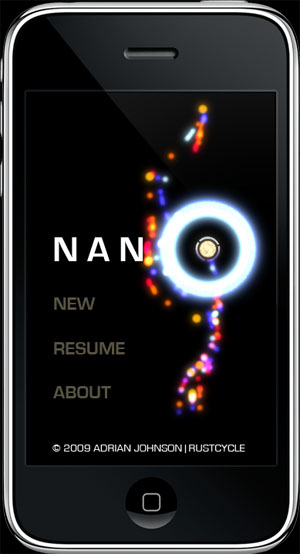


5: Nano
I will be reviewing Nano in the near future. Please check back on my writer’s page to see the review.

Nano is a very interesting application. I am not sure if it is a game or a meditation device, but I liked it either way. Basically, you direct streams of ions to receivers, trying to get only the good ones (cool colors) in, while keeping the bad ones (hot colors) out. In the background, a random music plays; it is created by how you play and what is streaming into the receivers at any given moment. To me, this was a really relaxing game, and I think that you will all enjoy it. You can get Nano for $.99 in the app store.


4: 3 and 4 card PRO
I have reviewed both 3 Card PRO and 4 Card PRO, check them both out.

Poker, that is what Avalinx has been doing in their PRO series, and that is what they will keep on doing. And why should they change? After all, they keep putting out amazing games that are perfect. This is my third top-10 list, and on everyone so far one of the PRO games has been included. These games are well designed, well implemented, and quite stunning. Basically, if you want to see what a perfect template for a game is, look no further than the PRO series from Avalinx. Both games will set you back $4.99.


3: All of the GO/Find/Locator Applications
You are in a strange city and have no idea where anything is. What if you need a doctor? What about the nearest police station? Hell, what if you need your 7/11 fix right this minute. No matter what you are looking for, Active Guru has an application that can find you the closest one by using your iPhone GPS. From your nearest pub to the nearest Burger Kind, the nearest hospital to the nearest vet, there is an application that will find you exactly where you need to go. The GO/Find/Locator applications will set you back either $.99 or $1.99, depending on which one you get.


2: Travel Help!
Following the lost theme from number three, what should you do if you are lost in another country? Do you know the proper emergency number (911 in the US, 999 in the UK) to call? What if you lost your passport, do you know how to contact the embassy? Rest assured, if you have your iPhone and the Travel Help! Application you are covered. Storing important phone numbers, websites, and other information you can easily access over 260 countries worth of emergency contacts. Likewise, you can also store additional information (coast guard data, auto services, etc.) that you add on. This application is essential for any world traveler. Travel Help! Will cost you $1.99 but is easily worth it.


And the #1 application of February 2009 is…
1: Smack Me
I will be reviewing Smack Me in the near future, please check back on my writer’s page to see the review.

I can not say enough about Smack Me. This is one of the best games I have ever played on my iPhone and is quickly becoming my favorite application of the year (sorry PRO series). The game is just like bob-it, but on the phone. Utilizing multi-touch, the accelerator, and just simple touch (one finger) the game uses anything you can do to your phone. Pinch it, smack it, freeze it, lift it; the game has everything possible. This is easily one of the most addictive games out there, on any platform, and one that you will love immensely. When I first got it, I didn’t put it down for an hour or two. The $1.99 that you will be spending on Smack Me is well worth it, and I recommend that you get it today.
Read more ...

Monday, March 9, 2009

iPhone Game Review: 4 Card Pro

Of the hundreds of variations of poker that exist, only handfuls are known to the masses. Texas Hold ‘Em, 5 Card Stud, and 5 Card Draw are among the best known variations of the game. 4 Card Poker, however, is not one of those that many people know; but that doesn’t mean that it doesn’t have a large following and fan base. Avalinx, the makers of the PRO series of casino card games for the iPhone and iPod Touch have decided that it is time for you to learn of this variation.


4 Card Poker is a variation of poker that is both popular and interesting. Instead of the normal table based game, you can choose to play only against the dealer, not against other players. Additionally, the game is two games in one (if you take an optional bet), meaning that you can both lose and win in the same hand. 4 Card PRO, the newest poker game from Avalinx, takes this odd variation of a popular card game and simply ports it to your iPhone, doing so in their normal flawless manner.

Did you know that a former US Navy Lieutenant Commander won over six thousand dollars while playing poker during the Second World War? Did you know that he then used the winnings to buy a seat in Congress (very interesting considering the person). Finally, did you know that the political clout gained by that seat got President Nixon into the Oval Office? Well, now you do! You can learn this, and more interesting facts about poker in general, simply by reading the ‘history’ section in the main menu of 4 Card PRO.

Following their standard model, Avalinx included a history section in 4 Card PRO to get you more in the game. Not only does it serve to entice, it also serves to educate and show that the game was well thought out and developed. I really do like these features as they help me learn and remember new items. Plus, as a frequent buzztime player at my local BW3, I can use this information to get lots of answers right; thanks for the help. My only issue is that the history section was not specific enough to 4 Card Poker, and instead it focused on Poker in general. I would like more game specific information in the future.

Still sticking to their standard model, Avalinx delivered another flawless and perfect concept and design in 4 Card PRO. The game play is easy, the controls great, and the menus intuitive. They have found a method that works and, unlike most companies in America these days, were smart enough to stick to it. This is a good idea, as people will come back for what they like, and they clearly like this. I believe that no other card game on the iPhone or iPod Touch, including the Texas Hold ‘Em game from Apple themselves, come close to being nearly as good, as pretty, or as sensitive, as the games in the PRO series. Congrats on doing so well.

An interesting feature of 4 Card Poker is that the dealer has an advantage over you. While you are dealt five cards, and need to pick the best four, the dealer is given six cards. While this sixth card is shown to all players (to help you calculate odds and decide to fold), this gives the dealer a huge advantage. In a two player game, like 4 Card PRO is set up as, odds are that that single card will help him 12% of the time. While this might not seem like a lot, it surely is when you are talking about lots of money.

To counter this, Avalinx has included an ‘ask the dealer’ option that helps you decide how to play the hand. Sometimes you need to muck (fold) and lose the anti, sometimes you should raise, and sometimes you should play the aces bet. No matter what you should do, the dealer will tell you what the odds say you should do. Your own risk aversion, however, is entirely up to you. This is a cool feature as it allows you to practice your odds counting, and it makes sure that you can learn how to play the game properly. This sort of thing is there to help out new players, and that makes sure that people will play the game over and over.

Though I complimented the template that Avalinx was using earlier, there is one problem with it. Sure, the game play is great and the graphics are stunning, but I want something new. Having the same card backing, same table backdrops, and same chip layout is starting to get a bit tiring. Frankly, this is starting to take away from the game because it is just not customizable enough, and there are not enough options for the total number of products they currently have out. I would recommend taking a week off of developing the next PRO game, and instead focus on revamping the graphics and looks of all of your games. Doing something like this will only make them better, and really should not harm the company in any way. As I sad, however, this harms 4 Card PRO only a little bit.

Overall, I believe that 4 Card PRO is yet another great additions to the PRO series from Avalinx. Like all of their games, it is flawless in design and perfect in game play. Plus, the looks are just killer. I really like the history sections and the fact that it is easy for a new player (I was new until I started playing with this game) to get on their feet. The only downside is that the overall look is starting to get tiring, and that drops 4 Card PRO down a half-star. Other then that, 4 Card PRO is an outstanding game for you iPhone or iPod Touch.


4 Card Pro has not been rated by the ESRB. The game is currently available on the iPhone and iPod Touch
Read more ...

Friday, March 6, 2009

iPhone Game Review: 3 Card Pro

Poker is one of the few card games that has seemingly infinite variations. Texas Hold ‘Em, Let ‘Em Ride, Three and Four card, and stud are just a few of the thousands of variations that there are in the poker world. Some are well known, and have World Series and television contracts. Others are less known, but are equally enjoyable and loved. No matter what version of poker you want to play, it looks like Avalinx has a version ready for you.


Three Card Pro is the newest game in Avalinx’s PRO series of casino games for the iPhone and iPod Touch. They decided that it was time to introduce people to a variation of poker that most do not know. To do this, they utilized their typical perfect style and design, along with flawless game play, and set up an easy-to-learn and enjoyable game for the iPhone. Three Card Pro allows you to learn a variation of poker that you had never heard of, and it does it without causing you a sweat.

Did you know that As-Nas was a game that was brought from Persia to France, where it became known as Poque? Did you know that Poque was then transported to new Orleans in the mid 1800s by the native French population? Did you know that the southern drawl transformed the name Poque to the name Poker that we know today? Well, you now do. Plus, you can know a whole ton of other facts too if you just read the ‘History’ section of Three Card Pro.

Like most of Avalinx’s games, Three Card Pro contains a ‘History’ section that serves to educate and teach new players about the game. Be it for trivia, poker night, or just because you like to know odd things about French wording, the ‘History’ section is always a good read. I really like the fact that you are able to read up about the past of the game you are playing. Most applications and games do not have something like this, so it makes sure that Three Card Pro stands out above the crowd. Plus, it also serves to make the game feel polished and complete.

Speaking of the feel, Three Card Pro is perfect and flawless, just like all other games in the PRO series. The touch controls are great, the game play easy, and the menus intuitive. Frankly, it seems as though Avalinx has a machine for popping out great games that are top-notch; that machine deserves overtime pay. Three Card Pro is a neat looking game, and it feels fully polished when you play it.

One of the nice features in Three Card Pro is the ‘Ask the Dealer’ option. During the game, you are allowed to ask the dealer what they recommend doing. The dealer seems to run on averages and preordained rules that big-money players follow. Sure, some of you are more risky then the dealer (there is a reason that I keep having to restart the game), and some are less risky; however, the dealer gives you a good base to start off of. I really like this idea, as it ensures that all new players (and most to Three Card Poker will be new) know how to play the game, and it makes sure that they are ready to. ‘Ask the Dealer’ is a nice way to make sure that players do not have to sweat when learning a new game.

Really, I have no complaints about Three Card Pro as a game or as an application. Instead, I have a complaint to Avalinx. Guys, I think that it is time that you make a crappy game. I am getting tired of having really good games thrown at me, and I really want to give something a really bad review. It is just an itch that I need to scratch. You guys should make a game that we can all insult, show that you are human, and give that top-notch machine a break. Call it ‘Just For Barga Shampoo’ or something like that, and let me review it. Or maybe do something to challenge the status quo; take on Apple and their Poker application, or something like that. Anything to get us talking more is a good thing.
Oh well, I tried…

Overall, I believe that Three Card Pro is yet another amazing game from Avalinx. The game play is stellar, the graphics good, and the learning curve is gentle. The addition of the ‘History’ section, as with most of their products, just adds to the feel of the game. Three Card Pro is polished as usual, and it is an outstanding product. As with most of the PRO series, Three Card Pro gets a five-out-of-five star review.


Three Card Pro has not been rated by the ESRB. The game is currently available on the iPhone and iPod Touch


Read more ...

Tuesday, February 17, 2009

iPhone Game Review: Textropolis

Are you a fan of Text Twist on Yahoo Games? Do you like to find hidden words in other words? Are you the type of person who likes any and every word game? If so, then the new word game from EeeenMachine is the game for you.


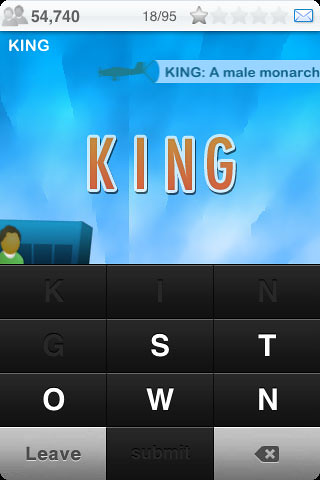
Textropolis is a basic word finding game. You are presented with cities from around the world and have a goal of finding the hidden words that are in each and every name. Cities like Kingston and Amsterdam are just a few of the thirty-some cities with nine-letter names that are featured in Textropolis. Take the city name, find as many words in it as you can, and grow your points (population). That is the goal of Textropolis, plain and simple.

There is something about the iPhone that makes it perfect for word and letter games. The touch controls, and the overall layout of the phone, makes the iPhone the perfect device for these sort of things. There is something right in just tapping a letter, as opposed to typing it, that makes these games feel so good. Plus, as they are highly addictive (you always want to find harder and harder words), they are perfect for your bus ride into work.
Textropolis starts you with just a single unlocked city which has 95 4+ letter words hidden in its name. Just start to type out a word, hit submit, and grow your city. As you complete words, your city grows, and you population (score) increases. Each time you complete a word, the definition of it is pulled across the screen by a small animated plane. This is a nice little touch to the game, though I often disagree with the definitions. After you find, and submit, just 10% of the words you are given a new city, and can start playing over there. If you get stuck, Textropolis allows you to sacrifice 1000 people to get a hint. I wonder how that works morally.

Textropolis has several things going from it. For starters, the simplicity of the game is exceptionally nice. I love it when I can just get into a game, no pressure, no stress. The lack of a time clock, or any of the other usual suspects in word games, makes this game nice to play. The fact that I can play for as short or long as possible also makes the game nice. The interface, which is simply touching letters, is well done and makes Textropolis one of the better word games currently out for the iPhone.

Another reason that Textropolis stands out from the pack is the fact that it has little touches that are unique and interesting. From the definition being pulled by an animated plane, to the points being represented by populations, the game seems to be full of these little add ons. They even have a new skyscraper built every 10% of the words you get. These little things make the game feel polished and well thought out. Plus, they go with the city theme quite well.

Textropolis, however, also has a few problems. With some of the cities having 130+ words hidden in their nine-letter name, it is exceptionally hard to remember which words you have entered. While the developer has the words scroll across at the top of the screen, it is hard to read all of them and it is even harder to remember which have already passed. Another problem is that the game is missing some words and some of the definitions are wrong. This seems like a simple mistake as it is hard to find all words that there are, or get definitions right when we have many. I suggest that the developer start a submission link on his site to collect this sort of thing, and let the users help make the game better. This sort of user-help makes us feel appreciated and like the game even more.

There are two main features that should be in Textropolis but are not. For starters, there should be a worldwide high score board. Sure, we would all eventually end up with the same score, but you could do something odd with it. How about make it a challenge, two people can play head-to-head, trying to get highest first. Something like that would make the game replayable and quite entertaining. Also missing, is a delete word button. If I make a word that is not real, or that I have already used, I have to delete the letters one-by-one. This system is slow and tedious, and makes that part of the game unenjoyable. This button should have been there from the start, and it needs to be added ASAP.

Overall, I feel that Textropolis is a good game. The gameplay is fun, the interface is well built, and the whole game feels well designed around a common theme. Plus, it is quite addictive. It is missing some features, which holds it back in the ranking, but it is still a great game. Plus, at $1.99, it is not breaking your bank. I believe that you will enjoy Textropolis and should go grab it today.

Read more ...

iPhone Game Review: Rainbow Ninja

Sometimes it is just plain hard to look at, analyze, and review a game. Sometimes they have caveats that you can just not get into words, or they are so unique that you are left struggling to find a way to describe the game. Sometimes, as in the case of RainbowNinja, the game is just not really like a game at all.


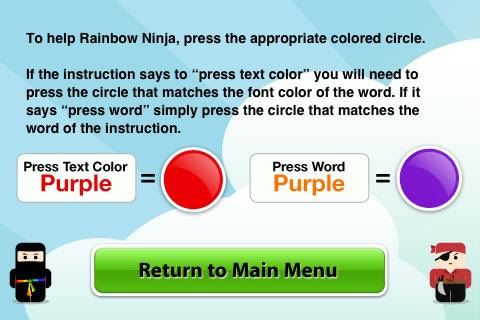
Flash games, and those like them, are simple and easy to play, but they are addictive as hell; RainbowNinja continues this policy. The game is basically a color test, where you either click the color that is written or the color the writing is in. It is just like Brain Age for the Nintendo DS, and it has the same basic challenges. After decoding what color to click, you simply click it, and the new challenge shows up. That is all that this game is. Yet, somehow, it is highly addictive.

Now, don't get me wrong, while it seems that RainbowNinja is exceptionally easy, the game is actually quite hard. In fact, the developer even describes it as "evil" and "deviously simple". This combination makes the game a fun and enjoyable play while also making it highly addictive. The game is designed simply to make anybody play it, and it does that well. RainbowNinja is like crack in the gaming world, the game keeps you coming back for more.

Speaking of playability, one of the nice features of RainbowNinja is how easy it is to pick the game up. The graphics (not that there are many) are easy for anybody to see and read. The actual game play is exceptionally easy to pick up on. This game is designed to be used by anybody, and everybody can use it. This sort of inclusive design is reminiscent of Nintendo's WII design and seems to be doing well in the market.

Due to the simplicity of RainbowNinja , it is hard to find anything that should be added to, or that is a problem, with the game. To be honest, there is nothing really wrong with the game, it is just missing a few good features. For starters, I believe that we should be able to post our high scores from the game onto a worldwide high score board. As this is like every flash game out there, we know that this is an essential part of the game. Additionally, I would like to hear background music during the game. While the sound effects are amazing, and downright cool, the lack of background music is a missing feature.

Overall, I believe that RainbowNinja is a game that is great to grab as a time waster. The addictiveness, and the ease of play, makes this game great for any bus ride to work or while waiting for class to start. It also is a great game to toss at the kids on a long car ride. I hope that there is an eventual high score list, but that really isn't a game breaker. The price tag, which is $1.99, seems a little high for this game, but isn't a deal breaker either. I believe that you will enjoy RainbowNinja and that you will get your money out of it.

On a side note, there is a contest being held by the makers of RainbowNinja to get the highest score ever. Until Feb. 28th, 2009, gamers can submit their score and compete for some prizes. The person with the highest score grabs $500. The second place person gets $100 and third place goes home with $50. An additional 10 people get T-shirts featuring the game. In other words, those 10 people get to become walking billboards. I think that these sorts of contests are a great move for starting game developers, as it creates a buzz and encourages people to buy their game. The more people buy it, the better they do. As for the walking billboards, hey, free advertising rocks.
Read more ...

Wednesday, February 11, 2009

iPhone Game Review: Baccarat Pro

For those of you who do not remember, Baccarat Pro was an Honorable mention in my best of 2008 application list...

Have you always wondered what James Bond's favorite card game is all about? Have you seen the high rollers playing a game that you can't understand but intrigues you? Are you interested in playing a game where you can actually bet on losing? If so, then the new application from Avalinx is for you.


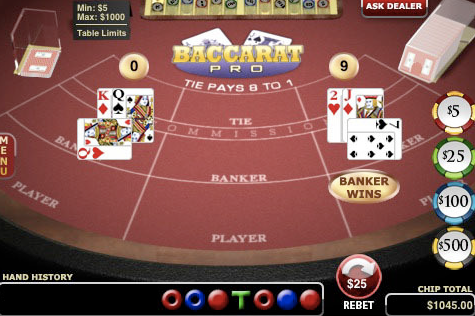
Baccarat Pro (pronounced bah-kuh-RAH) is an application designed to not only teach you how to play baccarat on your iPhone, but also to teach you the history, strategy, and terminology of the game. With a beautiful interface and amazing graphics, Baccarat Pro can to teach you everything you've ever wanted to know about the popular casino game. This piece of software will give you a good game, good graphics, and a history lesson all for just $4.99.


Pros
Baccarat Pro has several amazing features and adjustments that makes it worth your money. The interface works perfectly as each gesture is perfectly executed. All of the menus are easy to find and navigate. Game play is straightforward, as everything works as expected with no hitches. Almost everything is customizable, from the color of the felt tabletop to the card backs and even the number of decks in the shoe. The overall look is absolutely stunning, and the colors, graphics, and animations make my mouth water. This game is a rare beauty in the App Store, and it is one of the best looking and best polished games out there right now.

Did you know that while France is considered the home of Baccarat, it really originated in Italy in the late 1400s? Did you know that the 52-card deck - with the king of spades (David), the king of clubs (Alexander the Great), the king of hearts (Charlemagne) and the king of diamonds (Caesar) – all came to France during the Renaissance? Well, I didn’t, until I started thumbing through the History section in the main menu. Here you can find a whole slew of things about the game, from where it opened in the U.S. to different playing styles. The History menu is just one of several useful and enjoyable add-ons to this software.

Now, like many of you, I knew very little about baccarat; I was familiar with it from 007 and really nothing else. I had looked it up, experimented with it a little, but really knew nothing. Even with almost no knowledge, I was able to quickly master the game with Baccarat Pro. To help you, the application has a Terminology and Rules section in the main menu which will teach you all you need. You can see draw/stand/natural tables, some betting ideas, and get a rough understanding of the game. The Strategy section allows you to master betting, which, while mostly luck, is based on current trends and past cards revealed. Then, even while playing the game, it will help you. You can ‘Ask the Dealer’, which explains recaps the previous hand and the end result. It also keeps track of recent hands (up to fifteen, I believe) on the screen, so that you can properly bet following trends. Avalinx worked very hard to make sure that all players, new and seasoned, could start playing baccarat in no time at all.

Cons
I often find problems or slight flaws in all products, but with Baccarat Pro I was able to find nothing wrong. Really, everything was great. My only real complaint is that the price is kind of steep when you compare it to most of the other card games on iTunes, but when it in terms of quality and look it's well worth it. While the $4.99 price tag might seem a little high, remember that you get what you pay for.

Overall
As hard as it is for me not to find flaws in products, I was unable to find any real flaw in Baccarat Pro. The gameplay was perfect, the graphics stunning, and there was no real problems with the software. The price, while slightly steeper than most card game on iTunes, was well within the expectations given what this game was. Having enjoyed this application a lot, I am forced to give out my first ever 5-star review. Congratulations.


Read more ...

Monday, February 9, 2009

iPhone Game Review: 21 Pro: Blackjack - Sponsored

Are you interested in playing blackjack on your iPhone? Do you want to hone your skills before your trip to Vegas or Dubai? Are you interested in learning how to play one of the most addictive gambling games of all time? Finally, are you interested in doing all of this without risking any money, or even paying anything to learn it? If so, then the new application from Avalinx is the application for you.


21 Pro: Blackjack - Sponsored is a new application which allows you to play one of the classic casino games on your iPhone. Play against the house while you attempt to earn as many pixilated chips as you can. With control over the finest details of the game — from the looks of the table and cards, to the rules that the house plays by, to the payout for blackjack — you can get this game to be pretty close to your ideal experience. 21 Pro: Blackjack - Sponsored can do all of this and more, either for free (with a few ads before each new game) or for $4.99. Try the application out at the iTunes store today!


Pros
21 Pro: Blackjack - Sponsored has several nice features and tune-ups that make this application worth your time. The interface of the application — with its smooth renderings, vibrant colors, and changeable looks — makes this ideal for everybody. The layout is also a gigantic plus for it. You can navigate with ease and bet without a hitch. Furthermore, the layout allows you to easily find the menus and sections within the game. The touch controls work perfectly, and the whole application feels polished and flawless. To me, this feels almost as perfect as Apple's own poker game!

My favorite part of 21 Pro: Blackjack - Sponsored are the extras that you can access from its main menu. While the game itself is enjoyable, these are truly the hidden gems here and elevate it above its competitors. From the typical sections of rules and terminology to a detailed history of the game, these are some nice features. You can view different versions of the game, from 'European No-Hole-Card' to 'Spanish 21', and even learn to play them. This should impress your trivia-centric friends, and give you some spice to your game when you head to Vegas.

There is even a section called 'Master the Game', which, as it implies, lets you learn all the techniques that the pros use. The best part of this is the 'card counting' section, where the application teaches you several ways to count cards, and thus improves your chances of a nice payout. To help even further with this, the application will count the cards for you during the actual game (this makes sure that your practice is accurate).

Cons
There is very little that I did not like about 21 Pro: Blackjack - Sponsored. While the ads are annoying, clicking skip two times per new game is no big deal. Plus, if you drop $4.99 for the non-sponsored version, these annoyances quickly disappear. The only other thing that concerns me is that I occasionally got a glitch where it would automatically count an ace as 11, regardless of what the other card I had was. Hopefully it can be fixed quickly and easily.

What I Want To See
My biggest gripe is the fact that there is not as much customization as I would like. I would like to see a new dealer, more tables, more card backings, and a bigger chip set. These are probably easily addressed in an update (which they plan on doing regularly) and really are not a big deal. What I would really like to see is the option to have computer players playing alongside of you. While you would never play against them (you always play against the house), it would add a more realistic recreation of playing in Vegas, where your card counting has to include all players on the table. While this is not a necessary add-on, it would make the game more enjoyable and realistic in my mind.

Overall
21 Pro: Blackjack - Sponsored is one of the better applications that is out for the iPhone currently. The game is fun, polished, and reminds me a lot of Apple's own products, in terms of quality. While there are some things that are missing, the planned updates should be able to fix these quickly. The only thing holding this application back from a perfect is the fact that slight, and very rare, glitch when dealing with aces. If they can fix that, 21 Pro: Blackjack - Sponsored would become the perfect app for the iPhone-using blackjack player, be they a novice or a pro.21 Pro: Blackjack - Sponsored has not been rated by the ESRB. This game can currently only be found on the iPhone.

Read more ...

Software Review: OurStage Radio Application for the iPhone

Do you like indie music and the alternative concert scene? Do you like to find new artists all of the time? Interested in checking out new genres that are similar to the ones that you already like? If so, then the new application “OurStage Radio” from OurStage is what you are looking for.


OurStage Radio is an application that allows you to interact with music on your iPhone (or iPod Touch over Wi-Fi) in a whole new manner. You can search for new and independent music under any genre you like. You can search for your favorite artists and find music similar to theirs. OurStage Radio will even recommend and help you discover songs that you might like (which you can then rate, allowing it to learn what you really do like). While I am not a large fan of indie music, OurStage Radio even helped me to find some new bands which I am now interested in.


Pros
OurStage Radio has several nice and interesting feature which differentiate it from the other streaming radio applications that are available on your iPhone. The interface and general layout is a nice feature of this application. All of your options, choices, and desires are clearly labeled and can easily be found. The only difficulty with this is the fact that sometimes it takes some time to move from one to another, which makes you think that you did not hit the button properly. As OurStage Radio also allows you to use it without an account (though nothing is then saved), you are able to experience a large range of indie music even if you do not want to register.

The ability to have favorites and keep music for future reference (say, when you buy it on iTunes) is another nice feature. By allowing personal play lists of any type of music, artist, or general genre the user feels far more enticed and the interface seems more usable. My favorite part of these features is the recommendation tab. OurStage Radio nicely allows all users to search for any and every type of music that they are interested in. Select your favorite styles (from acoustic to heavy metal, from rap to folk) and click the recommend button. Soon after, you will start to experience some fun new music selections. Once you get a small number of ratings done, OurStage Radio then quickly will funnel out the unliked types and start giving you exactly what you want. After only about 30 minutes with OurStage Radio, I was able to get music and bands that I loved, which I then promptly went out to buy.


Cons
As with any application on the iPhone, or really any software, there are some problems with OurStage Radio. My first issue is really the biggest: it is so darn slow. I can understand a slow download and upload speed over an extended network, and even over the 3G network, but over Wi-Fi I cannot see any reason for the application to be that slow. I hope that this is merely a server issue and thus easily fixed, as opposed to one with the actual coding. The switching, starting, and rating of songs is slow and it makes it feel rather work-intensive to get through the less appealing music. Once you get to the songs you like, however (after about 30 minutes of rating), the system works fairly well as it just needs to download the songs once every four minutes or so

Another con with the OurStage Radio application is how much time it takes to start up. The application not only slowly loads songs, but it also takes roughly 30 seconds or so to boot up and start downloading that first song. This does irk me, as sometimes I want music right away. Also, this leads to some instabilities in the application itself. When downloading or uploading over a slower network, the application is prone to crashing. Even after restarting the iPhone (as Apple recommends), the application crashes or takes a fairly long time to do anything. This seems to be random, however, as sometimes I will get four crashes in a row and then nothing else for a few days.


What I Want To See
I would like to see two new features added to OurStage Radio. First is the ability to purchase the songs that you like on iTunes. Imagine being able to search for a style of music you like, listening to it, loving an artist, and then being immediately able to get it off of iTunes. This would both broaden the user base and allow the artists who use OurStage to be able to make more money off of it.

Additionally, I would also like to see (if this is allowed by Apple) the ability for the music to continue even after the application is closed. Using the built-in music player, I am able to surf the Web, check e-mail, and text without my music finishing. With OurStage Radio, the music stops playing immediately after I close the application. If it is allowed, I would love to see this update.


OurStage Radio is a good application that just has some growing pains. Due to its instability (at times) and the slower downloading speeds, I am forced to give it only 3.5/5 stars; however, with plans to update it roughly every other week, I expect OurStage Radio to quickly become a more stable and much, much better iPhone Radio application.
Read more ...

Friday, February 6, 2009

iPhone Application Review: CompareMe

Are you one of those people who are always looking for the best deal? Do you cut the coupons out of the Sunday morning paper? Do you try and haggle with anybody and everybody just on the off chance that they might break down and give you a deal? If so, then an application from Codedifferent is perfect for you.


CompareMe is an application for the iPhone and iPod Touch that is essentially a price comparison guide. You can take two measurements, prices, and discounts/premiums and compare the two. Basically, you have a small program that tells you what to buy. It also tells you how much you save (or how much more you spend) overall. Oh, and for those of you who forget basic math, it also converts units for you.

Now, before you start thinking that I am a price-conscious American, I want you to dig a hole and bury that idea six feet under. I go through my money like there is a hole in my pocket, and I rarely am concerned about price-difference. Sure, I will check the per-ounce price, but I really don’t care that much. CompareMe is not made for people like me. No, it is made more for those who buy in bulk.

Say you go out to the lumber yard and buy a pile of rocks, or a bundle of lumber. Those do not have a per-pound comparison so it is harder to judge. Plus, if some are on sale and others are not, it gets even tougher. Or say you went to Home Depot and were buying some nails; same scenario and issues. This is where CompareMe steps in and saves the day. The application is designed for exactly these sorts of situations, ones where it is hard to tell the price differentials. Plus, if stores offer price matching, you can use this application to show the actual prices per unit.

CompareMe is an interesting application. Most that I review and try out happen to be either flashy or expansive. CompareMe is neither; it is a small application, with one screen, that performs only one function. There are no nifty graphics and no interesting menus. Nope, this application is pretty simple. Yet, in simplicity comes usefulness. An application that performs its one duty, and does it well, is hard to come by these days in the App. store. CompareMe does its job perfectly and flawlessly, and that deserves commendation.

One of the nice things about CompareMe, besides it simplistic style and perfect function, is the fact that everything is easy to use. Using wheel-based menus, I can alter any data that I need to so that I can quickly come up with the comparisons. This will work perfectly in quick-paced haggling, where delay time harms your chances of a better price. Furthermore, the actual interface is easy to use and everything responds quickly to my touch. Sure, this application might not do much, but it does what it does well.

There are, however, a few problems with CompareMe. The first is the fact that there is no database of typical pricing. With an application that is designed to be used for haggling and the like, this database, which would be stored on a server and updated daily, based on your location, would be a perfect addition. In fact, it would cause the application to be used by anybody who is comparison shopping, not just those looking to haggle. I know that they are planning on adding some location-specific features, and I truly hope that one of them is the addition of this sort of database.

My other issue is the price of CompareMe. At $2.99, CompareMe is an expensive application for something so simple, especially because it is designed to save people money. I think that cutting the price to $.99 or even $1.99 would make the application worth it. However, if they incorporate the above mentioned database, I feel that $2.99 would be a steal.

Overall, I feel that CompareMe is a good application for your iPhone or iPod Touch if you are a business person or do a fair bit of bulk buying. The application is really geared towards that demographic, and I think that they could find good use for it. If a database is added, then I would think that CompareMe would be good for a vast majority of Americans, but as of now, it has a limited scope. Overall, I believe that the simplicity and the fact that the program does what it is designed to do, with no annoying extras, merits it a 4/5 stars.


Read more ...

Redirect

You will be redirected shortly to our new website. If you are not redirected within 5 seconds please CLICK HERE!

Copyright Notice

(C) All articles, postings, images, etc. on this site are protected by relevant copyright law, unless otherwise specified. To use any original material in totality please ask for author permission.

(C) 2009, all rights reserved by whalertly.blogspot.com, Robert M. Barga, and all contributing authors.